Interactive Crowd Wall for Trade Shows and Live Events
Turn Your Event into a Shared Interactive Experience
The Brand Gaming Crowd Wall transforms an ordinary large monitor or video wall, or touchscreen into a live experience that everyone at your event can help create.
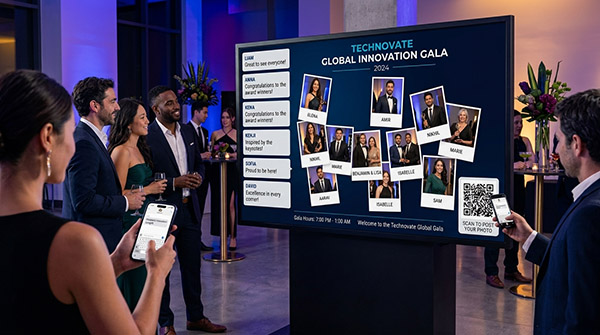
Attendees scan a QR code with their phones, optionally take a selfie, leave a comment or a vote on the branded screen. Optionally add a name or short message. Within moments, their personalized post appears on the large display for the entire crowd to see.
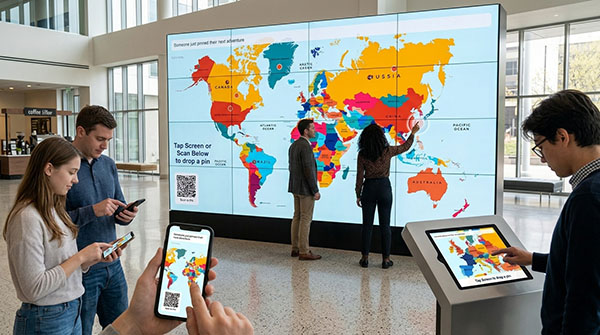
Every new contribution brings fresh movement to the screen. Pins appear with animation and sound, messages can be posted into a scrolling activity bar, and the running total shows how many people have participated. When the event is over, optionally create a slideshow video, pdf, or PowerPoint presentation of the screen.
Instead of displaying content that attendees simply watch, the interactive Crowd Wall gives them a reason to stop, participate and become part of the presentation.
Crowd Wall Demonstrations – Bring your Imagination
One Crowd Wall can become almost anything. Invite guests to choose a dream destination, vote for a favorite product, share an idea, identify a challenge or guess a hidden location.
Use a map, product image, photograph, illustration or completely original design. Bring us your idea, and we’ll transform it into an interactive experience your crowd helps create.
A few quick ideas
- Travel and destination maps for people to Pin
- Live event photo walls
- Wedding guest photos and messages
- Product and design voting
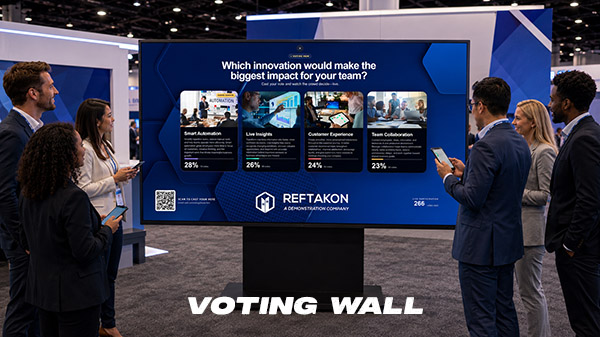
- Audience opinion polls
- Industry challenge surveys
- Customer and member location maps
- Employee recognition walls
- Goals, ideas and predictions
- Treasure hunts and location challenges
- Photo contests with audience voting
- Sponsor and brand activations
- Conference and trade show engagement
- Community and fundraising events
- Custom interactive experiences
Try this Demo in Real-Time
Scan the QR Code below and add your Photo –Once you arrive at the url, you may also leave a comment or submit a Emoji burst.
Try the Full Screen Demo. You will need a Widescreen Computer. Open the URL and Press the F11 key to go full screen. Then scan the QR Code to experience the user options.
 How the Interactive Crowd Wall Works
1. Scan the QR Code
A branded QR code is displayed directly on the Crowd Wall. Attendees scan it using the camera on their phone. There is no app to download and no special equipment for the attendee to install.
2. Take a Photo
Participants can take a quick selfie that becomes the face of their post. The photo feature can also be turned off when a simpler, photo-free experience is preferred.
3. Add a Name, Message, or Vote
Participants can add their name and a short note. These fields can be made optional or required depending on the needs of the campaign.
4. Watch the Post Appear
The new post appears on the large display within moments. A sound and animated message call attention to the latest contribution, while selected names and messages join the scrolling activity bar or however you’d like to design this.
The result is a constantly changing digital display created by the people attending your event.
More Than a Digital Message Board
A traditional event screen delivers information in one direction. Crowd Wall invites people to interact with the screen and with each other.
As more attendees participate, the display becomes increasingly colorful, personal and interesting. People naturally look for their own posts, read other messages, and compare responses.
This activity can help you:
- Attract attention to your booth from across the exhibit hall
- Give attendees a clear reason to stop and participate
- Turn a large screen into an interactive centerpiece
- Encourage conversations between visitors and booth staff
- Keep the display changing throughout the event
- Create a visual record of audience participation
- Extend the experience to attendees using their own phones
- Make the event feel more personal and memorable
The Crowd Wall is especially effective in spaces where a branded LED wall or large display is already part of the booth design but needs a stronger interactive purpose.
One Crowd Wall, Many Creative Possibilities
The background of the Crowd Wall can be replaced with artwork designed specifically for your campaign. That allows the same interactive system to support many different questions, themes, and event objectives.
Travel and Destination Walls
Ask attendees where they would like to travel, where their company operates, where they are visiting from or where they want to go next.
Product Preference Walls
Let visitors place a pin on a favorite product, feature, design, flavor, color, or service.
Opinion and Voting Walls
Invite attendees to show where they stand on a question or select the option that matters most to them.
Industry Challenge Walls
Display common business challenges and ask participants to pin the issue that has the greatest effect on their organization.
Community and Membership Walls
Show where members, customers, employees, or partners are located and watch the organization’s reach appear on the screen.
Goal and Idea Walls
Ask attendees to share a goal, prediction, suggestion, commitment, or idea for the future.
Treasure Hunts and Location Challenges
Turn the Crowd Wall into a guessing activity by asking visitors to select a hidden location. The correct location can be revealed later, creating a reason for attendees to return to the booth.
The system is not limited to a world map. The interactive area can use a regional map, product image, floor plan, branded illustration, chart, photograph or another custom visual that supports the campaign.
Fully Branded for Your Organization
Every Crowd Wall can be designed to match the event, sponsor, or corporate brand.
Customizable elements include:
- Background artwork
- Company logo and campaign graphics
- Instructions and promotional wording
- Brand colors
- QR code
- Pin colors and appearance
- Selfie or no-selfie participation
- Name and message fields
- Animated message bubbles
- Scrolling activity bar
- Participation counter
- Sound effects
- Landscape or portrait orientation
Crowd Wall can be prepared for a standard horizontal display or a tall vertical screen. This makes it suitable for large trade show monitors, LED video walls, kiosks and portrait-format digital signage.
Designed to Protect Important Artwork
Logos, headlines, QR codes, product images and other important graphics should remain visible throughout the event.
Protected areas can be built into the Crowd Wall to prevent attendee pins from covering these parts of the design. If someone selects a protected location, the system can automatically move the pin to the nearest available area or ask the participant to choose another location.
Posts can also be spaced apart to reduce overlapping and keep the finished Crowd Wall easy to view.
Built-In Crowd Wall Moderation
Live audience participation needs practical controls. The Crowd Wall includes a password-protected moderation page where event staff can review current contributions.
Authorized staff can:
- View the pins currently displayed
- Review participant names and messages
- See uploaded photo thumbnails
- Delete an individual contribution
- Clear the complete wall for a new session or event
- Automatically refresh the moderation view
- Ban/Block any device that violates the rules
A built-in word filter can reject inappropriate names or messages before they are displayed. These controls help protect the brand while allowing the experience to remain live and responsive.
Participate by Phone or Touchscreen
Most attendees will participate by scanning the QR code and using their own phones. This allows several people to interact without waiting in a single line.
The Crowd Wall can also accept direct touches on a compatible touchscreen. Booth staff or attendees can tap the large display to place a pin and optionally add a message.
Using phones and the touchscreen together gives event organizers greater flexibility when managing different booth layouts and audience sizes.
An Interactive Trade Show Activity That Grows Throughout the Day
Many trade show activities begin and end with one participant. The Crowd Wall becomes more engaging as additional people join.
The first few pins introduce the idea. As the wall fills, the growing display attracts more attention and encourages additional participation. Every visitor adds something that remains visible for the next visitor to discover.
That makes the Crowd Wall well suited for:
- Trade shows and exhibitions
- Corporate conferences
- Wedding Receptions
- Product launches
- Sales meetings
- Employee events
- Association meetings
- Customer appreciation events
- College and university events
- Tourism promotions
- Community events
- Sponsor activations
- Experiential marketing campaigns
Give Your Large Display a Reason to Be Noticed
A video wall may be impressive, but motion alone does not always create meaningful engagement. The Crowd Wall gives attendees a role in what appears on the screen.
They are no longer just looking at your content. They are helping create it.
Brand Gaming will customize the artwork, wording, colors and participation flow for your campaign. The finished Crowd Wall is designed to give your booth a distinctive interactive centerpiece while keeping the experience simple for attendees and manageable for event staff.
Frequently Asked Questions
What is an interactive Crowd Wall?
An interactive Crowd Wall is a shared digital display that allows event attendees to contribute using their phones or a touchscreen. Participants can place pins, add photos and submit short messages that appear on the large screen.
Do attendees need to download an app?
No. Attendees scan a QR code and open the Crowd Wall participation page in their phone’s browser.
Can attendees add their own photos?
Yes. The Crowd Wall can allow attendees to take a selfie that appears inside their pin. The photo step can be optional, required or removed.
Can the Crowd Wall be used without photos?
Yes. Participants who do not take a photo can be represented by a branded pin or dot.
Does the Crowd Wall only work with maps?
No. Maps are one popular application, but the background can be a product image, branded illustration, chart, floor plan, photograph or other custom artwork.
Can people enter a name or message?
Yes. The Crowd Wall can include a name field and a short-message field. Each field can be enabled, disabled, optional or required.
Can inappropriate content be removed?
Yes. Event staff have access to a password-protected moderation page. Individual pins can be reviewed and deleted, and the entire wall can be cleared when necessary. The system also includes word filtering for submitted names and messages.
Can pins cover our logo or QR code?
Protected areas can prevent pins from covering important parts of the artwork, including logos, headlines, product images, QR codes and the message scroller.
Does it work on portrait and landscape displays?
Yes. The Crowd Wall can be configured for horizontal 16:9 displays or vertical 9:16 displays.
Can attendees touch the large screen directly?
Yes. When the Crowd Wall is presented on a touchscreen, direct screen participation can be enabled in addition to QR code participation.
How quickly do new pins appear?
New contributions normally appear on the large display within a few moments of being submitted.
Is the Crowd Wall a lead-capture system?
The standard Crowd Wall is primarily an attendee-engagement activity. It can collect a participant’s name and short message. If your campaign also requires more extensive lead collection, discuss those requirements with Brand Gaming when planning the experience.
What equipment is needed?
The event needs a large display connected to a web-capable computer and a dependable internet connection. Attendees participate through their smartphones, and a touchscreen can be used when direct interaction is desired.
Can the Crowd Wall be reused?
The wall can be cleared between event days, sessions or groups. New artwork and wording can also be prepared for future campaigns.
Create a Crowd Wall for Your Next Event
Give attendees something to do, something to talk about and something they can immediately see on the big screen.
Contact Brand Gaming to discuss a customized interactive Crowd Wall for your next trade show, conference or live event.