Interactive Pin Display
A Trade Show Experience – Attendees add Pins and comments to your Image.
Your Content Goes Here
Where is your Next Adventure – Concept
Try this Demo: There are two ways to interact. If you scan the qr code, it will bring up your camera permissions. Accept using the camera and follow the instructions to take a selfie, add a pin and then add a note. Your pin will appear instantly.
The other way to interact with this above map is to touch the spot to add a pin. Then add a note and it will appear on-screen. A computer or iPad station can also be set up nearby, as seen in the photo below.
Call now! 1-877-530-4499 for a fast quote and more detailed information.
Why Brand Gaming? We make this easy to do!
We will work directly with you to execute your promotion or application to be certain you are leveraging the full value of our systems. Secondly, we know that one size does not fit all and you don’t have the time to master every aspect of our technology. Most importantly Brand Gaming will work with you to build out your promotion. The execution does require good communication.
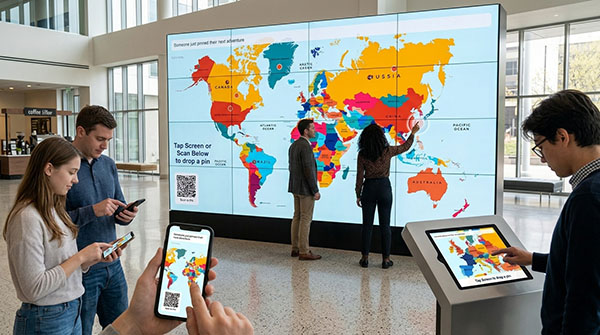
Most booth activations have the same shape: someone walks up, plays, wins or loses, walks away. The screen resets. Nothing carries over. Ten minutes later the booth looks exactly like it did before, and the next attendee has no idea anything happened there at all.
The Interactive Travel Map works differently. It’s a shared wall instead of a single-player game — a large world map on a booth display that fills up over the course of the show as attendees pin the places they want to go next. Each pin can carry a photo and a short travel tip. Nothing gets wiped between players. By hour three of day one, the map is covered in dozens of pins, and that visual density becomes its own attraction: people walk over specifically to see what everyone else put up there.
Important system details:
- The wall checks for new pins every 2.5 seconds.
- Phone and screen positions use percentage coordinates, so pins remain aligned at different resolutions.
- A shared configuration supports both 1920×1080 landscape and 1080×1920 portrait displays.
- Phone and wall artwork are deliberately kept in the same crop and coordinate space.
- Selfies are reduced to 200×200 JPEG images.
- Pins and photos are stored locally on the server; no database is required.
- The system keeps up to 500 pins.
- Notes are limited to 80 characters and pass through a server-side profanity filter.
- Phone users are asked to reword rejected notes.
- Touchscreen submissions with rejected notes still drop the pin, but remove the note.
- The moderation page refreshes every five seconds and is protected by an admin key.
- Clearing the wall also removes the saved participant photos.
- No names, email addresses, accounts, or other lead information are currently collected.
The central idea is strong: each attendee contributes a small piece to a visual display that becomes more interesting as the event progresses. It combines personal participation, phone interaction, touchscreen interaction, user-generated content, and a visible group result. I have a solid understanding of the current system and can now help you improve, rebrand, package, describe, or expand it.
It’s a different kind of booth traffic driver than an instant-win game, and for the right client it can outperform one. Here’s how the system works, what can be configured, and where it fits.
What It Actually Is
At its core, the activation is two web pages talking to the same backend.
The screen. A full-bleed 1920×1080 world map runs on your booth display — a TV, a monitor, or ideally a large touchscreen. A QR code sits in the corner with a “Scan to enter” prompt. As pins come in, they appear on the map in real time. A ticker along the bottom calls out the most recent submission, so the screen is never static even when nobody is standing in front of it.
The phone. Scanning the QR code opens a mobile page showing the same map. The attendee taps the spot they want to pin, optionally snaps a selfie with their phone’s camera, optionally types a short travel tip, and submits. Within a couple of seconds their pin is up on the big screen in front of them — and that two-second delay between “I tapped my phone” and “my pin appeared on that giant map” is the moment that makes the whole thing work.
There’s no app to download, no account to create, and no sign-in. The barrier to participation is scanning a code.
Two Ways to Drop a Pin
Both paths write to the same backend, so pins from either source appear together with no visual distinction. Which one you enable depends on the booth.
Phone-first (the full experience). The attendee does everything on their own device: tap the map, take a selfie, type a tip, submit. This is the richer interaction, and it has a real throughput advantage — five people can be filling out their pins simultaneously while nobody blocks the display. It’s also more comfortable, since typing a note and taking a selfie are things people would rather do on their own phone than on a shared screen with a line behind them.
Direct screen touch (the fast lane). On a touchscreen, tapping empty map space starts a stripped-down flow right there: drop the pin, optionally add a short note, done. No selfie, no phone required. This is the better fit for high-traffic booths, for attendees who won’t scan a QR code, and for anyone who just wants to jab a finger at Portugal and keep walking.
Running both at once is the usual recommendation. The phone flow captures the people who want to engage properly; the screen flow captures the people who’d otherwise skip it entirely.
Configuration Options
The activation is built to be re-skinned per client rather than rebuilt.
- Custom map artwork. The map is just a background image, so anything can go in its place: a client-branded world map, a single continent, a country, a US state map, a campus, a convention floor plan, or a stylized illustration matching brand guidelines. Because positioning is percentage-based, swapping the artwork requires no coordinate rework.
- Brand styling. Pin markers, tip bubbles, buttons, the ticker, and the QR panel can all be styled to the client’s palette and typeface.
- Custom prompt. “Where are you going next?” is the default, but the prompt drives everything. “Where’s your favorite job site?” “Where did you fly in from?” “Where would you open your next location?” The mechanic stays identical; the question determines whether this reads as a travel wall or a customer map or a hiring map.
- Selfie capture on or off. Photos make the wall more personal but raise the participation bar and introduce content you may want to review. Turning them off leaves a clean, text-only wall that needs no oversight.
- Tip field on or off. Some clients want the notes; some want pins alone as pure visual density.
- Reset behavior. Manual reset by default, which is usually what you want at a multi-day show — the wall keeps filling across all three days and looks best on the last one. A scheduled overnight auto-reset can be wired in instead for events where a fresh start each morning makes more sense.
- Lead capture. By default, nothing is collected — no name, no email, no data. That’s a feature: it removes hesitation and lets people participate without any privacy calculation. When a client does need leads, an optional name and email step can be added to the phone flow, or the map can be paired with a separate instant-win game that handles the capture.
- Pairing with a prize game. The map draws people in and holds them; an instant-win game converts them. Running the map on one screen and a branded prize wheel, slot machine, or scratch-off on a second screen is a strong two-screen booth setup — the map is the ambient attraction, the game is the reason to talk to booth staff.
- Same-architecture variants. The shared-screen-plus-phone pattern supports other formats using the same underlying system: a live word cloud where attendees text in one word about a topic and the words grow by frequency, or a live crowd guess where everyone submits a number and the screen builds a real-time histogram before revealing the answer at intervals.
Why It Works on a Trade Show Floor
- It builds its own crowd. An empty booth game looks like an empty booth game. A map with sixty pins on it looks like something is happening — and that’s visible from three aisles away.
- Dwell time is dramatically longer than a single-play game. People stay to read other people’s tips, look for their own hometown, and check whether anyone pinned somewhere they’ve been. Reading the wall takes minutes, not seconds.
- It’s a genuine conversation starter. “Oh, you pinned Lisbon — have you been?” is a far easier opening for booth staff than “can I tell you about our product.” The map gives your team something neutral to talk about with a stranger.
- Zero staff overhead. Nobody hands out tablets, resets a screen, or explains rules. The QR code does the onboarding. Staff are freed up for actual conversations.
- No throughput bottleneck. Because participation happens on attendees’ own phones, ten people can engage at once. Compare that to a single kiosk where each play locks up the station.
- It photographs well. A dense, colorful, obviously-crowded map is the kind of thing clients post to LinkedIn and include in post-show recaps — and attendees who added a selfie have a personal reason to photograph it too.
- Low friction by design. No download, no signup, no data required. The most common objection to booth activations — “what are you going to do with my information” — doesn’t come up.
- It accumulates value across a multi-day show. Most activations are equally good on day one and day three. This one gets better.
What You Need to Run It
- A booth display. Any large screen works; a touchscreen unlocks the direct-tap flow and the tap-a-pin-to-read-the-tip interaction.
- A modern browser in kiosk or fullscreen mode.
- Internet access for the display and reasonable cell coverage or guest wifi for attendee phones.
- Hosting — the activation runs on our server, so you get a URL and a QR code. Nothing to install.
- Custom map artwork and brand assets, or we’ll build the map to spec.
Setup on-site is opening a URL on the display. That’s the whole install.
Frequently Asked Questions
Do attendees need to download an app?
No. The entire attendee experience runs in a mobile browser. Scanning the QR code on the booth screen opens a standard web page — no app store visit, no install, no account creation, no login. This matters more than it sounds like it should: app downloads are where the majority of booth activations lose people, because an attendee walking a show floor is not going to install software for a thirty-second interaction. Removing that step is the single biggest driver of participation rate. The page works on any current iPhone or Android device, and if someone declines camera access, the flow simply continues without the photo step rather than breaking.
How quickly does a pin appear on the big screen?
Within about two and a half seconds. The display polls the server for new pins on a 2.5-second interval, so worst case an attendee waits roughly that long between hitting submit on their phone and watching their pin appear on the map in front of them. That near-immediate feedback is the payoff moment for the whole interaction, so it’s built to be reliable rather than instantaneous. Polling on a fixed interval was a deliberate choice over a persistent connection, because trade show wifi drops constantly and a dropped poll costs nothing — the display just catches up on the next cycle instead of needing to reconnect.
What happens if the venue wifi goes down?
The display keeps showing every pin it has already received, so the wall stays populated and looks completely normal to anyone walking by. New submissions can’t reach the server during an outage, and the display resumes picking up new pins automatically as soon as the connection returns — there’s no restart or intervention needed. The system was architected with venue networking in mind: no websockets to reconnect, no session state to lose, no handshake to redo. In practice, attendees on cellular data can often still submit even when the booth wifi is struggling, since their phones aren’t dependent on the venue network at all.
Can we use our own map, or does it have to be a world map?
Any image can be the map. Because pin positions are stored as percentages rather than pixel coordinates, the background art is genuinely interchangeable with no reconfiguration. Clients have good reasons to swap it: a US map for a domestic service business, a single country or region for a regional brand, a state map for a franchise, a campus or facility layout, a convention floor plan, or fully custom illustrated artwork matching brand guidelines. The prompt changes with the map — a US map paired with “where’s your next project?” is a completely different activation from a world map paired with “where are you going next?” even though the underlying system is identical.
Do you collect attendee names or email addresses?
Not by default, and that’s intentional. The standard build collects nothing personally identifying: a pin position, an optional tip, an optional photo, and a timestamp. No name, no email, no phone number. Removing the data ask removes the hesitation, and participation rates go up accordingly. When a client does need leads from the activation, an optional name and email step can be added to the phone flow, or the map can run alongside a separate branded instant-win game that handles capture properly. Many clients find the better setup is to keep the map friction-free as the attraction and let a paired prize game do the lead work.
How do the selfie photos get handled, and can we turn them off?
Photos are captured through the phone’s own camera in the browser, uploaded to the server, and stored as individual image files that the pin data points to. The reset function deletes all stored photos along with the pin list, so nothing persists after you clear the wall. Selfies can be disabled entirely with a config change, which some clients prefer — a text-only wall has nothing to review, no privacy questions, and a cleaner look. If photos are enabled and the client wants oversight, a review step can be added so images are approved before they appear on the screen rather than posting live.
When does the wall clear, and can it clear itself?
By default it doesn’t clear on its own. Pins accumulate indefinitely until someone visits a private, key-protected reset URL, which empties the pin list and deletes the stored photos in one step. That manual behavior is usually the right default for a multi-day show, since the wall is at its most impressive on the last day after three days of accumulation — an automatic overnight wipe would throw that away. For events where a fresh start each morning is preferable, a scheduled or time-based auto-reset can be wired in instead. It’s a small change and worth deciding before the show rather than during it.
What if two people pin the exact same city?
Pins that land close together nudge apart automatically so they don’t stack directly on top of each other. It’s a light spacing pass applied on drop, not a full collision simulation, but it keeps popular destinations from turning into a single unreadable blob as the wall fills. Both pins remain fully tappable, and each still shows its own author’s tip when touched. On a busy day you’ll see clusters form around the obvious places — Tokyo, Paris, Hawaii — and those clusters are visually good, because a dense knot of pins reads as popularity rather than as a rendering problem.
Is a touchscreen required?
No, but it adds two things. On a standard non-touch display, the map still shows pins in real time, the ticker still calls out new arrivals, and the full phone flow works normally — it’s a live, self-building visual and it works fine that way. A touchscreen adds the ability to tap any pin and read that person’s travel tip in a pop-up bubble, and it enables the direct on-screen pin drop for attendees who won’t scan a QR code. If a touchscreen is available or rentable for the show, it’s worth it. If not, the activation still delivers most of its value.
How does this compare to running an instant-win game at the booth?
They solve different problems. An instant-win game is a conversion mechanic: a defined interaction, a prize, a captured lead, a clear ending. The map is an attraction mechanic: it builds visual gravity, extends dwell time, and gives your staff a natural way to start conversations, but it doesn’t inherently capture anything. Neither replaces the other. The strongest booth setup we see is both — the map running on one screen as the thing that pulls people in from the aisle, and a branded prize wheel, slot machine, or scratch-off on a second screen as the reason to actually talk to someone on your team.
Can we get the pin data after the show?
Yes. Everything submitted lives in a single structured data file on the server, so after the event you can be sent the full pin list — positions, tips, timestamps — plus the photo files if selfies were enabled. Clients use this a few ways: pulling the tips into post-show social content, mapping where attendees actually came from, or measuring participation against booth traffic estimates. Worth requesting the export before the wall is reset, since the reset deletes both the pin data and the photos. If you want the data preserved automatically, an archive step can be added to the reset so each show’s wall is saved off before clearing.
How long does it take to get one built?
Because the system is already built, a client deployment is a re-skin rather than a ground-up project: swapping the map artwork, applying brand colors and fonts, setting the prompt, toggling the photo and tip options, and generating the hosted URL and QR code. That’s typically a short turnaround measured in days, not weeks. The longest item on the list is usually waiting on the client’s map artwork and brand assets. If you’re working against a fixed show date, get in touch early with the date and we’ll work backward from it — and if artwork is the holdup, we can build the map to spec.
Ready to Put One in Your Booth?
Get in touch and tell us the show date, the screen you’re working with, and what you’d want the prompt to be.
Brand Gaming — [email protected] — 877-530-4499, 9–6 EST
Note what actually worked for you with “digital plinko” and “digital prize wheel” — you rank on the descriptive category term, not a brand name. So sell it as Crowd Wall and rank on the configuration names, each on its own page: interactive travel map wall, trade show photo wall, digital photo mosaic wall, live word cloud wall, virtual signature wall.
Crowd Wall configurations
Map Wall — attendees pin their city or hometown (built)
Product Wall — pins land on a product image or floor plan (built)
Stadium Wall — pins fill a venue, arena, or seating chart (built)
Donor Wall — donations displayed by name and tier, sorted by top givers
Mosaic Wall — selfies assemble into a logo or product shot as the day goes on
Signature Wall — finger-sign a jersey, banner, pledge, or ribbon-cutting
Milestone Wall — pins mark “years with the company,” anniversary timeline, or roadmap
Word Cloud Wall — one-word answers grow in real time, doubles as lead-qual data
Poll / Prediction Wall — live bars or brackets that move as votes land
Wall of Wins — instant-win results spotlight winners by first name
Team Wall — internal sales kickoffs, all-hands, employee appreciation